Evaluating the 100 Metropolis Icons Set for Modern Design Projects
In the landscape of digital design, visual consistency is often the difference between a functional interface and an engaging user experience. As urbanization accelerates and city-centric themes become prevalent in branding, app development, and data visualization, designers frequently seek assets that capture the essence of metropolitan life with precision and style. The 100 Metropolis Icons Set has emerged as a significant resource in this niche, offering a comprehensive collection tailored to those who need high-quality, scalable graphics that represent urban environments, infrastructure, and city living.
This evaluation explores the specific characteristics of the 100 Metropolis Icons Set, analyzing its technical specifications, stylistic approach, and practical applications. By comparing it against broader categories of iconography and considering various formats such as JPG, EPS, AI, PSD, and PNG, we can determine where this asset fits within a professional designer’s workflow. Whether you are building a smart city dashboard, designing a travel application, or creating editorial illustrations, understanding the strengths and limitations of this set is crucial for making an informed purchasing decision.
Defining the Scope: What Is the 100 Metropolis Icons Set?
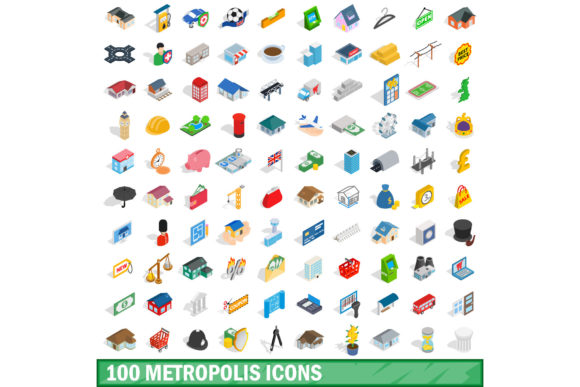
At its core, the 100 Metropolis Icons Set is a curated library of one hundred distinct vector icons focused on urban themes. Unlike generic icon packs that might scatter city-related imagery among thousands of unrelated symbols, this set is specialized. It targets the specific vocabulary of metropolises: public transportation systems, architectural landmarks, urban planning elements, traffic management, and lifestyle amenities found in large cities.
The distinction of this set lies in its thematic cohesion. When assembling a UI or illustration, mixing styles can lead to visual clutter. A dedicated metropolis pack ensures that every element—from a subway train to a skyscraper—shares a common visual language. This consistency reduces the cognitive load on users navigating digital interfaces and provides a polished look for print materials. The set is designed for versatility, allowing designers to scale these vectors without losing resolution, which is essential for responsive web design and high-resolution print outputs.
Stylistic Analysis: Flat vs. Isometric Approaches
One of the most critical decisions when selecting an icon set is its visual style. The market generally divides into flat design, line art, and isometric perspectives. The 100 Metropolis Icons Set distinguishes itself by offering options, including a notable variation in isometric 3D style. Understanding the difference between these approaches helps clarify why this set might be the right choice for your project.
The Utility of Flat and Line Styles
Flat icons are characterized by their simplicity, lack of depth, and use of solid colors. They are lightweight, load quickly, and integrate seamlessly into minimalist interfaces. If your project requires a clean, modern aesthetic where content takes precedence over decoration, standard flat icons from this set would be highly effective. They are particularly useful for mobile applications where screen real estate is limited.
The Impact of Isometric 3D Style
The inclusion of isometric 3D style variants adds a layer of sophistication and depth that flat icons cannot achieve. Isometric design uses a specific projection method to create a three-dimensional illusion on a two-dimensional plane. For urban themes, this is particularly powerful. A 3D bus stop or a detailed skyline rendered in isometric view provides a richer narrative context. It allows designers to convey complexity and detail without overwhelming the viewer.
However, this style comes with tradeoffs. Isometric icons require more careful placement to maintain alignment and perspective. They may not work well in extremely dense dashboards where space is at a premium. Yet, for hero sections, infographics, or presentation slides, the 100 Metropolis Icons Set in isometric format can serve as a striking focal point, elevating the perceived value of the design.
Technical Formats and Workflow Integration
A robust icon set must be compatible with a wide range of software and output requirements. The availability of multiple file formats is a key indicator of a product’s professionalism and utility. The 100 Metropolis Icons Set supports a comprehensive array of formats, each serving a specific purpose in the design pipeline.
- AI (Adobe Illustrator) and EPS: These vector formats are essential for scalability. They allow designers to edit paths, change colors, and resize icons without any loss of quality. This is crucial for brand identity work where exact color matching and custom modifications are necessary. The vector nature of these files ensures that the 100 Metropolis Icons Set remains sharp whether printed on a billboard or displayed on a smartwatch.
- PSD (Photoshop): Layered PSD files offer flexibility for raster-based workflows. Designers can manipulate individual layers, apply effects, and combine elements directly within Photoshop. This is particularly useful for creating composite illustrations or adding texture to the icons before exporting them.
- PNG: Portable Network Graphics provide transparent backgrounds and are ready-to-use for web and app development. High-resolution PNGs ensure crisp rendering across different devices and screen densities.
- JPG: While less flexible due to compression and lack of transparency, JPGs are useful for quick previews or when file size constraints are minimal and background integration is required.
This multi-format support means that the 100 Metropolis Icons Set can fit into almost any professional environment, from freelance graphic design to enterprise-level software development teams.
Comparative Evaluation: Strengths and Limitations
When evaluating the 100 Metropolis Icons Set, it is helpful to compare it against alternative resources. Many free icon libraries offer thousands of icons, but they often lack thematic focus. Others may be expensive enterprise suites that include unnecessary variety. Here is how this set stacks up in terms of value and functionality.
Strengths
The primary strength of this set is its specialization. For projects centered on urbanism, real estate, logistics, or tourism, searching through a generic pack for relevant icons can be time-consuming. A dedicated set streamlines the process. Additionally, the inclusion of isometric 3D options provides a premium feel that is harder to find in budget-friendly alternatives. The variety of formats also reduces friction in the handoff between designers and developers.
Limitations and Tradeoffs
With only one hundred icons, the set is not exhaustive. If your project requires a vast array of specific urban details—such as unique local transit maps or hyper-specific regulatory signs—you may find gaps. In such cases, you might need to supplement this set with other resources. Furthermore, the isometric style, while visually appealing, may not align with brands that strictly adhere to flat, two-dimensional design guidelines. Designers must weigh the aesthetic benefits against the need for strict adherence to existing design systems.
Decision Factors: When to Choose This Set
Selecting the right asset depends on your specific project needs. The 100 Metropolis Icons Set is an excellent choice under the following circumstances:
- Urban-Focused Projects: If you are designing for smart cities, municipal governments, or urban planning firms, the thematic relevance of these icons will resonate immediately with your audience.
- Need for Visual Depth: If your design goals include creating immersive experiences, such as interactive maps or detailed infographics, the isometric variants offer the necessary depth and dimensionality.
- Workflow Flexibility: If your team works across both vector editing software and raster-based platforms, having access to AI, EPS, PSD, PNG, and JPG files ensures that no bottleneck occurs during production.
- Time Efficiency: For designers pressed for deadlines, a pre-curated, cohesive set saves hours of searching, filtering, and style-matching that would be required with open-source libraries.
Conversely, if you are building a general-purpose social media app or a finance tool where city themes are irrelevant, this set may not provide sufficient value compared to a more diverse, all-encompassing icon pack. Similarly, if your brand guidelines strictly prohibit 3D or isometric elements, you would need to rely solely on the flat variations, potentially limiting the full potential of the purchase.
Practical Applications and Examples
To illustrate the utility of the 100 Metropolis Icons Set, consider a few realistic scenarios. A startup developing a ride-sharing application could use the transport-related icons to create intuitive buttons for booking, tracking, and payment. The isometric cars and buses would add a playful yet professional touch to the user interface.
In another example, a real estate agency launching a campaign for a new downtown condo complex could use the architectural icons to highlight nearby amenities like parks, gyms, and transit stations. Using the vector formats, they could customize the colors to match their brand palette perfectly, ensuring consistency across brochures, websites, and social media ads.
For educational purposes, a textbook on urban geography could utilize the set to create clear, consistent diagrams explaining concepts like zoning, population density, and infrastructure networks. The clarity of the vector lines ensures that even small details remain legible in print.
Conclusion on Fit and Value
The 100 Metropolis Icons Set represents a targeted, high-quality solution for designers working within the urban and metropolitan domain. Its combination of thematic specificity, stylistic variety including isometric 3D options, and extensive format support makes it a versatile tool for a wide range of creative tasks. While it may not replace a comprehensive generalist icon library, it excels as a specialized asset that enhances the visual storytelling of city-centric projects.
By carefully assessing your project’s aesthetic requirements, technical constraints, and thematic focus, you can determine if this set aligns with your needs. For professionals seeking to elevate their designs with coherent, scalable, and visually engaging urban graphics, this set offers a compelling option that balances quality, variety, and practical utility. It serves not just as a collection of images, but as a strategic resource for communicating complex urban concepts with clarity and style.