100 Training Icons Set: A Comprehensive Evaluation for Designers
In the landscape of modern digital design, visual communication is paramount. Whether creating educational materials, corporate training modules, or e-learning platforms, designers require a robust library of symbols that convey complex ideas instantly. The 100 Training Icons Set has emerged as a popular resource for professionals seeking to streamline this process. This collection, characterized by its isometric 3D style, offers a distinct aesthetic alternative to traditional flat iconography. For stakeholders evaluating vector illustration assets, understanding the specific capabilities, formats, and strategic applications of this set is essential before making a procurement decision.
Understanding the 100 Training Icons Set
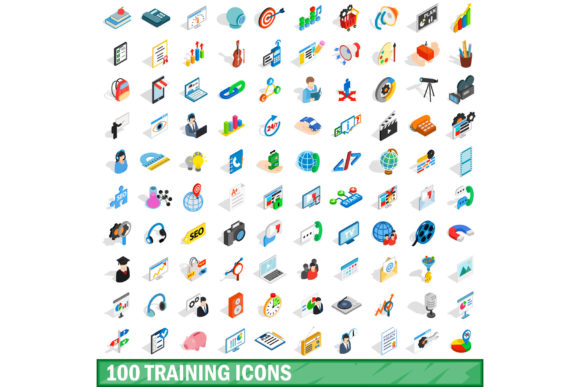
At its core, the 100 Training Icons Set is a curated bundle of one hundred distinct graphical elements designed primarily for instructional and professional development contexts. Unlike generic icon packs that cover broad categories such as weather, navigation, or social media, this set focuses on themes relevant to learning, skill acquisition, and organizational growth. Common motifs include graduation caps, books, lightbulbs representing ideas, gears symbolizing mechanics or processes, and target goals.
The defining characteristic of this particular set is its rendering style. It utilizes an isometric 3D style, which creates a pseudo-three-dimensional appearance using orthographic projection. This technique allows objects to be viewed from an angle where all three axes appear equally foreshortened, providing depth without the distortion associated with perspective drawing. This style lends a sense of tangibility and sophistication to the icons, making them stand out in crowded interfaces or printed materials.
Technical Specifications and Format Versatility
One of the primary factors influencing a designer’s choice of asset library is file compatibility. The 100 Training Icons Set addresses this need by offering a multi-format distribution package. Understanding these formats is crucial for integrating the icons into various workflows effectively.
- EPS and AI: These are vector-based formats. They are indispensable for scalable design, allowing icons to be resized to any dimension without loss of quality. This is particularly important for print materials like brochures, posters, or large-scale signage where clarity at high resolutions is required.
- PSD: The Photoshop Document format provides layered files. This allows designers to edit individual components of the isometric illustrations, change colors, or adjust shadows directly within Adobe Photoshop. This level of customization is vital when brand guidelines require slight modifications to standard icon designs.
- PNG: Portable Network Graphics offer rasterized versions with transparent backgrounds. These are ideal for web use, ensuring crisp display across different screen densities while maintaining the visual integrity of the 3D effect.
- JPG: Joint Photographic Experts Group files provide compressed raster images. While less flexible than PNGs due to the lack of transparency support, they are widely compatible and useful for quick previews or low-bandwidth environments.
Evaluating the Benefits of Isometric 3D Style
Why might a project manager or creative director choose the 100 Training Icons Set over simpler alternatives? The answer lies in the psychological impact of isometric design. In user interface (UI) and user experience (UX) design, isometric illustrations are often used to reduce cognitive load. By presenting abstract concepts—such as "data analysis" or "team collaboration"—in a structured, spatial manner, users can grasp the meaning more quickly than with abstract flat symbols.
Furthermore, the 3D aesthetic adds a layer of perceived value. In corporate training environments, where engagement is critical, visually rich graphics can enhance the perceived professionalism and thoroughness of the content. The consistency provided by a unified set ensures that all training materials maintain a cohesive visual identity, which reinforces brand recognition and trust.
Tradeoffs and Considerations
While the benefits are clear, there are tradeoffs to consider. Isometric 3D styles are inherently more complex to create and render than flat icons. This complexity can lead to longer load times if not optimized correctly for web delivery. Designers must balance visual fidelity with performance, especially when deploying these icons on mobile devices or slow connections.
Additionally, the specific focus on "training" themes may limit the versatility of the set. If a design project requires icons for unrelated topics such as finance, healthcare, or technology hardware outside the scope of education, the 100 Training Icons Set may not provide sufficient variety. Users should carefully audit the contents of the set to ensure alignment with their broader design needs.
Situational Fit: When to Use This Set
The 100 Training Icons Set is a strong fit for several specific scenarios:
- E-Learning Platforms: For websites and apps dedicated to online courses, the thematic relevance of the icons reduces the need for custom illustration, accelerating development time.
- Corporate Onboarding Materials: Internal documentation, employee handbooks, and presentation slides benefit from the professional yet engaging nature of isometric graphics.
- Workshop and Seminar Marketing: Promotional materials for events focused on skill development can leverage the dynamic look of 3D icons to attract attention.
Conversely, this set may not be the optimal choice for minimalist design systems that prioritize extreme simplicity and speed of recognition above all else. In such cases, flat line icons or monochrome solid icons might be more appropriate.
Practical Decision-Making Insights
For those evaluating whether to purchase or utilize the 100 Training Icons Set, a practical approach involves assessing the existing design system. If the current aesthetic is flat or two-dimensional, introducing isometric elements can serve as a powerful accent strategy rather than a complete overhaul. This hybrid approach allows designers to highlight key training milestones or interactive elements without disrupting the overall UI hierarchy.
It is also advisable to test the scalability of the EPS and AI files early in the process. Ensuring that the vector paths are clean and well-organized can save significant time during the editing phase, particularly when adapting the icons for dark mode interfaces or specific color palettes.
Conclusion
The 100 Training Icons Set represents a specialized tool in the designer’s arsenal, offering a blend of thematic relevance and aesthetic sophistication. Its isometric 3D style provides a unique visual language that can elevate training materials and educational content. However, success depends on aligning the set’s strengths with the specific requirements of the project. By carefully considering format compatibility, thematic scope, and design context, professionals can determine whether this asset library supports their goals effectively. For projects centered on learning and development, it offers a compelling solution that balances visual appeal with functional utility.